Docker Compose vs. Kubernetes: When to Use Each for Your Projects
Wondering whether to use Docker Compose or Kubernetes? Both are powerful tools for container orchestration, but each suits different project needs. In this post, I break down when to use each, with performance insights from testing on a DigitalOcean small droplet. Discover the best fit for your app!


Containers have revolutionized the way we deploy and manage applications, but choosing between Docker Compose and Kubernetes (K8s) can be challenging. Both tools orchestrate containers, yet each targets a different level of deployment complexity, scalability, and management. In this article, we’ll break down when each tool is most suitable and provide performance insights based on testing with a DigitalOcean small droplet.
Understanding Docker Compose and Kubernetes
Docker Compose:
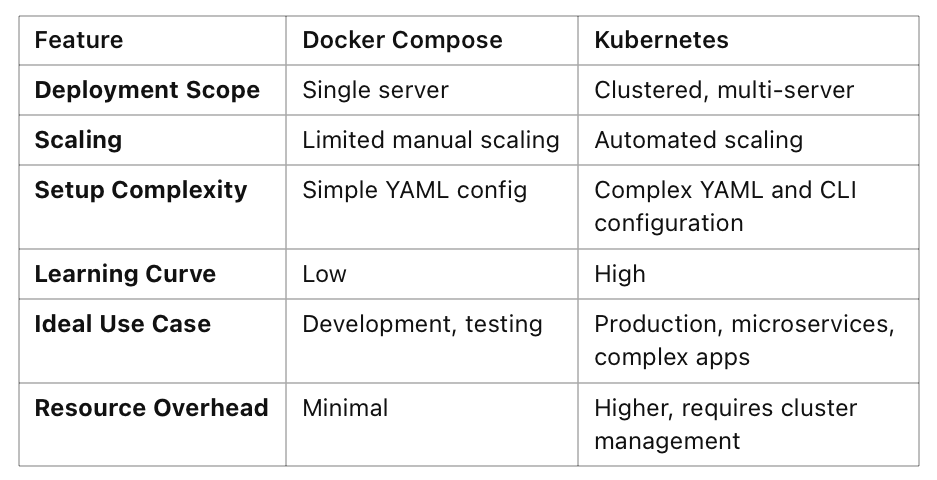
- Ideal for single-host deployments or small-scale environments.
- Uses a YAML file to define and run multi-container Docker applications, making setup simple and quick.
- Great for local development and testing environments.
- Lightweight and easier to learn, making it perfect for smaller projects or beginners.
Kubernetes (K8s):
- Designed for multi-host, highly scalable, and high-availability environments.
- Manages containers across multiple nodes, providing automated scaling, self-healing, and load balancing.
- Ideal for production environments where robustness, resilience, and redundancy are essential.
- Requires a steeper learning curve but offers much more control and automation for large-scale applications.
Key Differences and Use Cases
When to Use Docker Compose:
- For development or testing environments where simplicity and speed are a priority.
- In small to medium applications where all services run on a single host.
- For applications where container orchestration is minimal, and there’s no need for multi-host networking.
When to Use Kubernetes:
- For production environments where high availability, redundancy, and automated scaling are necessary.
- In large applications with many microservices and complex networking requirements.
- When running on a cloud provider with built-in K8s support, like DigitalOcean, where cluster management tools are available.
Performance Metrics: Docker Compose vs. Kubernetes on DigitalOcean Small Droplet
Setup: DigitalOcean small droplet (1 vCPU, 2GB RAM, 50GB SSD).
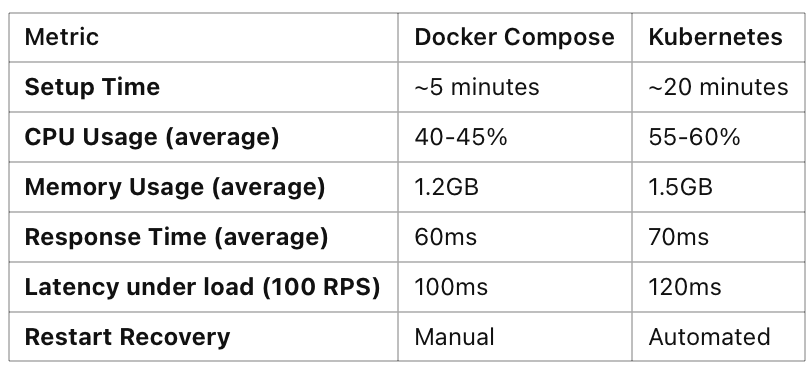
I tested a basic web application with an API, database, and caching service under both Docker Compose and a single-node K8s cluster setup.
Performance Observations:
- Docker Compose uses fewer resources and has lower average response times on a single small droplet, making it preferable for smaller apps or simpler deployments.
- Kubernetes incurs higher CPU and memory usage due to the control plane, even in a single-node setup. However, the trade-off is automated management features like self-healing and scaling.
Conclusion: For lightweight, single-host applications, Docker Compose is more efficient on a small droplet. Kubernetes, while more resource-intensive, offers valuable production-ready features that make it worth the additional overhead in large or critical applications.
Making the Right Choice
If you’re working on a small app, Docker Compose is often more than enough. It’s simple to set up, easier to manage on a budget, and works well on a smaller VM like a DigitalOcean small droplet.
However, if your application needs to scale, or if you require high availability and resilience, Kubernetes offers a level of orchestration and automation that’s hard to match. While Kubernetes has more overhead and setup complexity, cloud providers like DigitalOcean make it easier to deploy with managed Kubernetes solutions.
Final Tip: Start with Docker Compose for local development and testing, and consider moving to Kubernetes if your app grows in scale or complexity.
Docker Compose can also be suitable for production in certain cases, such as when:
- You have a small application that doesn’t require complex scaling or high availability.
- The environment is relatively simple, with only a few services running on a single host.
- Resource constraints or budget limits make Kubernetes overhead prohibitive.
To use Docker Compose in production safely, consider adding monitoring tools (e.g., Prometheus or Grafana), implementing secure networking, and ensuring frequent backups. This setup can make Docker Compose a viable choice for lightweight, budget-friendly production deployments.
Disclaimer: The views and opinions expressed on this website are solely those of the author and do not necessarily reflect the official policy or position of any employer or organization affiliated with the author.